Shoutout to Client for making this
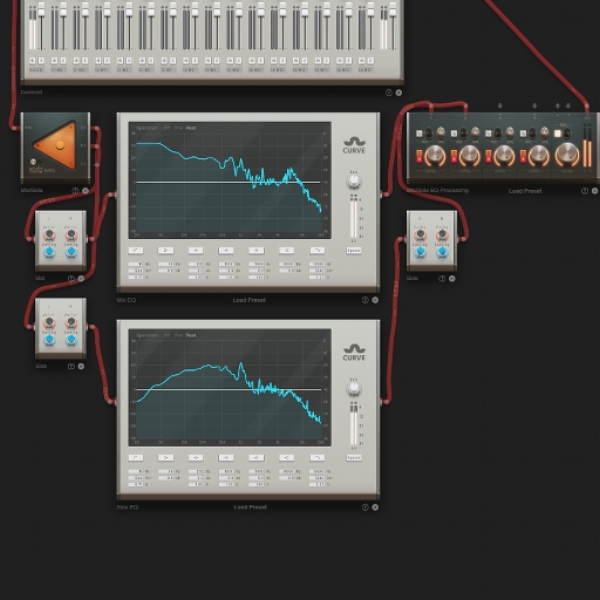
Here is how its made
open remix to see :))
The equalization (EQ) of the mid and side components of a stereo audio stream are adjusted individually using the mid/side EQ processing approach in audio production. The "mid" stands for the audio data that is shared by the left and right channels, or, more specifically, what is in the middle of the stereo image. The term "side" refers to the audio data that differs between the left and right channels; in other words, it is what is on the sides of the stereo image.
You may target and adjust the frequencies on the sides and in the centre of the stereo field separately by utilizing the Mid/Side EQ. This enables more exact control over a mix's spatial and tonal elements.
**Steps**
1. Get a splitter
2. Get two Panoramas and put them underneath the Splitter. Connect the splitter to both Panoramas
3. Place two Curves next to it
4. The first Panorama is gonna be the Mid channel, set both panning values to “Center” (TIP its faster to type it in)
5. Route the Mid Panorama to the first Curve EQ and then to the first channel of the Minimixer
6. The second Panorama is the Side, set both panning knobs to “Center” but the right “Factor” knob set it to -1
7. Route the Side Panorama to the second Curve EQ, and then place another Panorama and route the Curve signal to it
8. For the Panorama you just placed, only thing you need to do is set the right “Factor” knob to -1
9. Route the second Side Panorama to the second channel of the minimixer
10. Its all set up all you need to do is connect the master input to the minimixer output and connect the centroid or what is holding all the sounds to the Splitter and its done :DDD
thanks for explaining that!
might want to put that in the description, ngl
Aug 24, 23
separates the stereo channel into two channels, a "mid" channel which is all the sounds that are center, and "side" which are all that are on the sides of the stereo image
Aug 13, 23
Based on the following equations:
Mid = Left+Right
Side = Left-Right
Left = Mid+Side
Right = Mid-Side
I'm not sure what you have here fits that, therefore doesn't work.
I believe you have the right first part, but you don't add *and* subtract the MS separated signals
Instead what you have done is kept the M signal, and then for some reason inverted the R channel of the Side signal.
Aug 13, 23
Edit: your method works. Because the two signals aren't panned LR at the minimixer, this works. Very nice!
It follows the same process I use in Ableton when doing live MS recordings.
Worth noting that M/S reverb is an awesome use of MlS processing. Keeps the reverb tight on Mids and options to be looser on the Sides
Aug 13, 23
It’s very confusing ;-;
Aug 13, 23
Ohhhh alrighttt
Yeah I have always inverted the right channel of the side for some reason
But I did notice it’s the same if I do it on ableton with the EQ on M/S mode or using the patcher on FL Studio it’s the same
Aug 13, 23
Instead:
Create two mergers and two splitters.
Both M and S need to be split again, post-processing.
Send M and S to merger1
Send M to merger2
Send S to a panorama with both factors set to -1 then to merger2.
Create a minimixer.
Send merger1 to channel one and pan L
Send merger2 to channel 2 and pan R.
Aug 12, 23
heyyy! u cant just put a fire wavetrap beat in this tutorial
What does this technique do
Based on the following equations: Mid = Left+Right Side = Left-Right Left = Mid+Side Right = Mid-Side I'm not sure what you have here fits that, therefore doesn't work. I believe you have the right first part, but you don't add *and* subtract the MS separated signals Instead what you have done is kept the M signal, and then for some reason inverted the R channel of the Side signal.
heyyy! u cant just put a fire wavetrap beat in this tutorial
Wow